Tesla

5M+
Installs
Tesla, Inc.
Developer
-
Auto & Vehicles
Category
-
Everyone
Content Rating
-
customersupport@tesla.com
Developer Email
-
https://www.tesla.com/legal/privacy
Privacy Policy
Screenshots
editor reviews
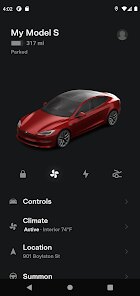
You know that app that lets you check on your car from anywhere, like a little digital window into your Tesla? That's the Tesla app, straight from Tesla, Inc. It's not a game, a social network, or a to-do list—it's a companion app for a physical product. So, if you don't own a Tesla, there's really no point in downloading it. But for those who do, it's the main way you interact with the car without actually sitting in it. After you install it from the App Store or Google Play (it's free, no ads, but you need a Tesla account and to have bought the car), your first impression is just how clean and minimal it is. It feels like the car itself—sleek, modern, and a little bit futuristic. There's no clutter, just a big image of your car, some key stats, and a few icons.
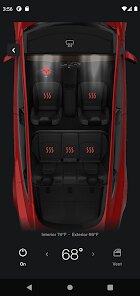
The moment you swipe open the app, it tries to connect to your car, which can take a second or two. Once it locks on, you're looking at a 3D model of your specific Tesla. You can tap the image to open the frunk or trunk, or hold the lock icon to pop the charge port. For daily use, most people start with the climate control section. On a hot day, you tap the fan icon and set the temperature before you even walk outside. There's also a trip planner that shows your remaining range and, if you plug in a destination, it'll map out Supercharger stops. One thing that feels a bit clunky at first is the way you scroll between menus at the bottom—it's smooth, but there's no clear "back" button. You just have to know you can swipe. Over time, though, it becomes second nature, and you start trusting it more than the car's own touchscreen for quick checks.
After using it for a while, I think this app is perfect for someone who likes having total control at their fingertips. You can let a friend borrow your car by granting them remote access for a set time, or schedule your charging to take advantage of cheaper electricity rates. It's honestly handy enough that I've kept it installed even when I wasn't driving as much. But here's where it gets different from, say, the FordPass app: FordPass feels like it's trying to do too much—payment sites, parking tips, and a loyalty program all packed in. Tesla's app just sticks to what matters. However, if you're not a tech person who likes to micromanage, you might find it unnecessary. I know a few people who uninstalled it after a week because they just wanted to drive, not "optimize." For me, it stays on my phone. It's simple, fast, and feels like the car is always waiting for me.
features
- 🔑 The climate control is the standout feature. You can not only turn on the AC or heat, but also defrost the windshield, turn on the seat heaters, and even vent the windows—all before you step foot inside. In the FordPass app, you get basic climate control, but it doesn't let you vent windows or adjust individual seat heaters remotely. In the Tesla app, it's all right there, and the car actually responds within seconds, which feels almost magical.
- 🗺️ The live trip planner is honestly smarter than Google Maps'. When you type a destination, it factors in your car's current battery level, your driving speed, and weather conditions, then maps out Supercharger stops with precise charging times. The car also pre-conditions the battery on the way to a charger so you charge faster. In comparison, the Mustang Mach-E's app just shows a static map with nearby chargers—no dynamic routing that talks to the car's battery system.
- 📸 The "Sentry Mode" viewer is another thing that sets it apart. If your car has Sentry Mode, the app lets you watch live camera feeds from all four cameras, or view recent events that triggered an alert. Ford's BlueCruise doesn't offer a similar live camera remote viewing system. It's a peace-of-mind thing that makes you feel like you're sitting inside the car even when you're in a different state.
pros
- ⚡ The biggest advantage over other EV apps like the Rivian app or the Mercedes me app is the sheer speed of the connection. Tesla's app almost always wakes up the car instantly, while others often take 10–15 seconds to connect, or fail entirely. The response time for locking/unlocking or starting climate control is nearly real-time.
- 🛞 Another strength is the clean, intuitive interface. Where apps like the Kia Connect app or the BMW My BMW app have cluttered dashboards with too many buttons and ads for services, Tesla keeps it simple. You never feel lost, and everything you need is usually one tap away, not buried in a menu tree.
- 🔄 The "Phone Key" reliability is also a big plus. Once you set it up, you just walk up to the car and it unlocks—no digging for your phone or tapping it to a reader. Android Auto and Apple CarKey are trying to mimic this, but Tesla was doing it first and does it more seamlessly.
cons
- 🔋 The lack of offline functionality is a real pain. If you're in a spot without cell service (like a remote trailhead), the app is completely useless. You can't unlock the car, check battery, or even pop the frunk. In contrast, FordPass lets you use Bluetooth to lock/unlock your car even without cellular data, as long as your phone is nearby. Tesla's app is too dependent on Tesla's servers being up and your phone having a signal.
- 📉 Another weakness is how slow the app can be when the car is in deep sleep. If you haven't driven for a day or two, the app might take 20–30 seconds to wake the car up and fetch its status. The Rivian app handles deep sleep more gracefully, often showing the last known state immediately and then updating smoothly.
- 🗺️ The built-in map in the app lacks offline caching. If you're planning a road trip through an area with spotty coverage, the route may just stop or show a loading spinner. In contrast, Google Maps (which is separate, but FordPass integrates it) lets you pre-download maps. Tesla's app doesn't offer any way to save routes or maps for offline use.
Recommended Apps
![]()
My Name Meaning
KDR Games4
![]()
Find my Phone - Clap, Whistle
FunGear inc4.4![]()
Pet To Human - Pet into Human
Applax Pte. Ltd.4.2![]()
Custom Kicks
Sneakerz4.5
![]()
Italian Brainrot: Quiz & Wiki
EDEO TECH LIMITED0![]()
PrankGen - Funny Prank Sounds
DATONG FUN3.8![]()
Opera Mini: Fast Web Browser
Opera4.3![]()
Artimind: AI Art Generator
Apero Vision Lab4.3![]()
Prediction 2026: Savage Reveal
LKPixel0![]()
Ghost detector radar camera
Prank apps & Joke apps - Herdoza Studio3.9![]()
Imagine : AI Art Generator
Vyro AI3.6![]()
BitMind: AI Detector & Creator
BitMindAI2.8![]()
Number Locator - Phone Tracker
Allegany Boys Camp Inc4.6![]()
myChevrolet
General Motors (GM)4.6![]()
Version AI: AI Photo Generator
Apptribe Dijital4.5











Disclaimer
1.Apklifts does not represent any developer, nor is it the developer of any App or game.
2.Apklifts provide custom reviews of Apps written by our own reviewers, and detailed information of these Apps, such as developer contacts, ratings and screenshots.
3. All trademarks, registered trademarks, product names and company names or logos appearing on the site are the property of their respective owners.
4.Apklifts abides by the federal Digital Millennium Copyright Act (DMCA) by responding to notices of alleged infringement that complies with the DMCA and other applicable laws.
5.If you are the owner or copyright representative and want to delete your information, please contact us info@Apklifts.com.
6.All the information on this website is strictly observed all the terms and conditions of Google Ads Advertising policies and Google Unwanted Software policy.
7.Apklifts.com is an independent, information-only website which is 100% free to all the users.