

Pixelup - AI Photo Enhancer

5M+
Installs
Codeway Dijital
Developer
-
Video Players & Editors
Category
-
Rated for 3+
Content Rating
-
pixelup@codeway.co
Developer Email
-
https://storage.googleapis.com/codeway.co/pixelup.co/privacy.html
Privacy Policy
Screenshots


editor reviews
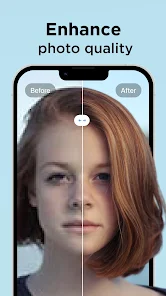
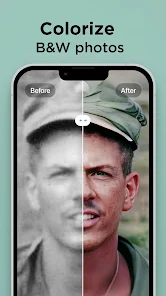
Pixelup is an AI photo enhancer app developed by Codeway, a studio known for AI-powered creative tools. It lives in the photo and video utility category on both Google Play and App Store. People mainly use it to upscale old or blurry photos, restore faded colors, sharpen low-res images, and even colorize black-and-white pictures. A casual user might download it after digging up old family photos from a dusty album or realizing their phone's zoom shots look like mush. After launching it, the first impression is clean and modern, with a minimalist landing page that pushes you straight into selecting a photo. The splash screen shows a flashy before-and-after demo, making it feel capable right off the bat. It is free to download, but after the first few tasks, it asks you to sign up for a free trial or start paying. There are in-app purchases and ads, though the ads show up more if you stick to the free tier.
When you actually start using it, the flow is fairly straightforward. You tap the big button to pick a photo from your gallery or take a new one, and the app processes it in a few seconds. During that wait, a progress bar fills up, and there is a little watermark on the output unless you upgrade. The interface is simple overall, with just a few tools: Enhance, Colorize, Repair, and Portrait. Moving between them feels logical. For instance, if you upload a grainy 2009 concert shot, the enhancement mode pushes it to something close to modern phone quality, though faces might look a bit smoothed out. One practical tip is to stick with photos that have clear subjects instead of landscapes with complicated textures, because the app tends to hallucinate weird pixel blobs on grass or trees. The onboarding does not push too many tutorials, which feels good, but the pop-up for signing up hits you right after you edit your first image, which can kill the mood if you just wanted to test it out quickly.
After using Pixelup for a while, it feels like a solid tool for casual restoration projects but not a daily driver for professional photo editors. Someone who loves digging through archives or wants to print old family snapshots will get a lot from it. But if you are a serious photographer who works with RAW files or large prints, this app is too limited, because the output resolution even after upscaling is not that massive. What makes Pixelup different from something like Adobe Photoshop's Super Resolution is the simplicity. You do not need to learn layers or masks, just tap and go. I kept it installed because it handles the occasional blurry pet photo or scratched-up childhood picture, and the colorization feature is surprisingly decent for free. But I could see someone uninstalling it if they find the watermark annoying or if they are not willing to pay for the subscription tier after the trial runs out.
features
- 🎨 AI-based enhancement tools, including upscaling, colorization, repair, and sharpening, all wrapped in one app. No need to juggle three different apps like Remini for sharpening and DeOldify for colorization.
- 🖼️ Really good at fixing underexposed or low-resolution selfies and portraits. Skin tones look less plastic than what you get from Remini, and the face correction does not turn everyone into a mannequin.
- ⚡ Fast processing even on older phones. While Adobe Lightroom's Super Resolution can take ages on mid-range devices, Pixelup finishes in under 10 seconds for most photos.
- 🆓 You get a handful of free edits before hitting a paywall, which is generous compared to Topaz Photo AI, which has no free tier at all and wants you to buy a license upfront.
pros
- 📱 Dead simple interface compared to Remini. Remini buries tools inside a messy dashboard with ads popping up everywhere. Pixelup keeps it clean: pick a photo, hit enhance, and you are done.
- 💰 The subscription price is cheaper than Luminar Neo's monthly plan. If you only need occasional restoration, Pixelup's trial period lets you test it without immediate pressure.
- 👾 Works offline for basic enhancement tasks. Unlike VanceAI, which requires a constant internet connection, Pixelup lets you process local images without uploading them to a server, so privacy is slightly better.
cons
- 💧 Heavy watermark on free output. Remini at least lets you save small previews without a watermark. Pixelup covers the entire image with a big logo, so free usage is almost pointless unless you crop it out.
- 🎲 Hallucinates details on complex textures like fur or foliage. Adobe Photoshop's AI does a much cleaner job with these edge cases because it has more training data.
- 🖤 No batch processing support. If you have 50 old photos to restore, you have to tap through each one manually. Topaz Photo AI supports batch upscaling, which is a major time saver.
- 💾 Output resolution is still limited compared to desktop tools. A 4x6 photo upscaled to 8x10 looks okay on a phone screen but pixelates visibly when printed, whereas Gigapixel AI handles this much better.
Recommended Apps
![]()
Daily Horoscope
KADO Apps4.4
![]()
FOX Sports: Watch Live Games
Fox Digital Services, LLC3.7
![]()
Fake Call from Santa Claus
ThunderClap4.2![]()
Google Maps
Google LLC4.2![]()
PhotoLayers-Superimpose,Eraser
handyCloset Inc.4.6![]()
Healthy Benefits+
Solutran, Inc.4.5![]()
SuperMe - Avatar Maker Creator
THE.DEMON3.7![]()
Air Horn
Tenoku4.8![]()
Football Wallpaper HD 4K
Orange Infotech Studio4.6![]()
Artplay - AI Photo & Video
Hideaway Technology Limited4.5![]()
Horoscopes – Daily Zodiac Horo
Mail.Ru Group4.1![]()
Passport Parking
Passport Labs, Inc.2.5![]()
ParkMobile: Park. Pay. Go.
Parkmobile, LLC4.3![]()
FestAI: Ghost Detector App
Now Tech3.2![]()
Photo Tool
COLIFER LAB4





























