

Pretty Makeup - Beauty Camera

50M+
Installs
Photo Editor Perfect Corp.
Developer
-
Video Players & Editors
Category
-
Rated for 3+
Content Rating
-
baiwang2013@gmail.com
Developer Email
-
http://makeupcamera.photoeditorperfect.top/PrivacyPolicy/
Privacy Policy
Screenshots
editor reviews
Pretty Makeup is a beauty camera app from Perfect Corp., the same team behind the YouCam series of beauty and makeup tools. You don't need to create an account when you first use it, which is nice, just download, launch, and it is ready to go. On Google Play, it shows over 100 million downloads, and it is free to install, though there are in-app purchases and some ads. The first thing I noticed after opening it is the huge number of features they pile onto the home screen: skin smoothing, virtual makeup, facial reshaping, filters, and even some AI-powered effects. It is like a full mobile beauty salon, but honestly, my first impression was that it felt a bit crowded and overwhelming.
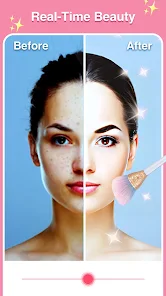
Once I started actually using Pretty Makeup, the interface became easier to navigate. You pick a photo from your gallery or snap a new one, and then the editing screen appears with all the tools along the bottom. The sliders for smoothness, whitening, and slim face are instantly adjustable, and you can see the change in real-time. The virtual makeup section lets you try on lipstick, blush, or eye shadow, which is fun for experimenting. During onboarding, you are shown a quick tutorial, but even without it, most actions felt intuitive after tapping around for a minute. A small tip I discovered is that you can tap and hold on the original image to compare it with your edits, which makes it easier not to overdo the changes.
After using Pretty Makeup for a week, I think it is great for anyone who wants quick and dramatic beauty edits with minimal manual effort. People who like to share polished selfies on social media will probably enjoy it, but if you are a photographer who wants natural, subtle retouching, you might find the effects too aggressive. What makes it stand out from apps like FaceTune or BeautyPlus is the sheer range of virtual makeup options. Still, the heavy ad push and some paid-only features made me consider uninstalling it after a few uses. I kept it around for the times when I just want a fast, glamorous look with one tap.
features
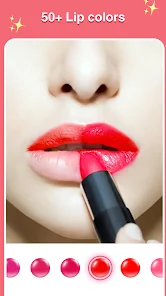
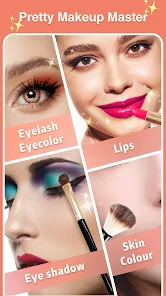
- 💄 Virtual makeup try-on is incredibly detailed. You can choose from hundreds of shades of lipstick, eyeshadow, and blush, and the app applies them realistically onto your face, matching your skin tone and facial structure. It is much more precise than the basic color overlays you see in something like Candy Camera.
- 🪞 Real-time beauty filters that work during live preview. While many beauty apps let you edit after taking a photo, Pretty Makeup can smooth your skin and reshape your face as you frame the shot, which is great for video calls or recording clips.
- 🍑 The "Perfect Skin" feature uses AI to detect blemishes, dark circles, and uneven tones, then removes them in seconds with a single tap. Other apps like BeautyPlus require you to manually spot-heal each area, so this is a time-saver.
- 🖼️ It comes with a huge library of preset makeup looks that you can apply instantly. This is outstanding because you can achieve a full makeup effect without manually adjusting every slider, which is perfect for quick editing sessions.
pros
- 👍 It offers facial reshaping tools that are more precise than many competitors. You can adjust your jawline, cheekbones, and nose width individually, which is rare in free beauty apps. BeautyPlus locks some of these behind a paywall.
- 👍 The app continuously updates its filter library with current trends. Unlike Meitu, which can feel outdated, Pretty Makeup adds new styles every few weeks, keeping the content fresh for regular users.
- 👍 There is no mandatory registration needed to use basic features. You can jump straight into editing without giving up your email or phone number, which is a big convenience compared to apps like FaceApp that push sign-ups on first launch.
cons
- 👎 Ads are frequent and sometimes intrusive. A 30-second video ad can appear between editing steps, which breaks your workflow. Candy Camera has fewer ad interruptions during actual editing.
- 👎 The free version is extremely limited. Most advanced features, like removing background or using premium makeup packs, require a subscription. FaceTune offers more generous free editing tools before asking for payment.
- 👎 The AI effects can sometimes look unnatural. If you use the skin smoothing too aggressively, faces end up looking plastic and waxy. BeautyPlus tends to preserve more skin texture at higher settings.
- 👎 App size is quite large, taking up over 200 MB of storage. For users with limited phone space, this can be a problem compared to lighter alternatives like YouCam Makeup.
Recommended Apps
![]()
Daily Horoscope
KADO Apps4.4
![]()
FOX Sports: Watch Live Games
Fox Digital Services, LLC3.7
![]()
Fake Call from Santa Claus
ThunderClap4.2![]()
Google Maps
Google LLC4.2![]()
PhotoLayers-Superimpose,Eraser
handyCloset Inc.4.6![]()
Healthy Benefits+
Solutran, Inc.4.5![]()
SuperMe - Avatar Maker Creator
THE.DEMON3.7![]()
Air Horn
Tenoku4.8![]()
Football Wallpaper HD 4K
Orange Infotech Studio4.6![]()
Artplay - AI Photo & Video
Hideaway Technology Limited4.5![]()
Horoscopes – Daily Zodiac Horo
Mail.Ru Group4.1![]()
Passport Parking
Passport Labs, Inc.2.5![]()
ParkMobile: Park. Pay. Go.
Parkmobile, LLC4.3![]()
FestAI: Ghost Detector App
Now Tech3.2![]()
Photo Tool
COLIFER LAB4





























