
Hair Color Changer: Change you

5M+
Installs
Face & Body Tune Photo Editor SRL
Developer
-
Video Players & Editors
Category
-
Rated for 3+
Content Rating
-
android@Bodytuneapp.com
Developer Email
-
http://braincake.net/pixl_privacy.html
Privacy Policy
Screenshots
editor reviews
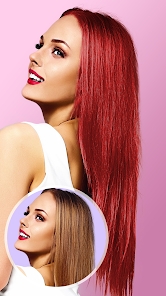
The app Hair Color Changer is a photo-editing tool that focuses specifically on changing hair colors in your selfies and portraits. It belongs to the beauty and photo retouching category. You can take a new photo or pick one from your camera roll, then tap on the hair area to see a preview with different shades. The main uses are trying out fantasy colors, covering grays virtually, or testing a new look before heading to the salon. I downloaded it from Google Play because it showed up in the top charts for free beauty apps. After launching, the first impression was decent. There is a prompt to register or sign up, but you can skip it. The free version had no paywall for the basic colors, though some premium shades are locked. It also shows ads between edits, which can get annoying quickly.
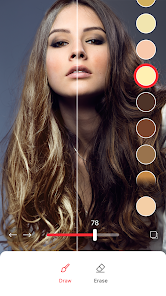
Using the app feels straightforward at first. You tap the "start" button, select a photo, and the interface shows a brush tool colored in a bright tone. The app tries to auto-detect hair strands, but on my photo with wavy brown hair, it missed some edges. You can manually adjust the brush size and zoom in to paint over the missed spots. The app then processes the new color with a short loading time. I tried blue, pink, and a natural chestnut. The colors lay over the hair well, but they sometimes spill onto the forehead or background if your hair is messy. A helpful tip is to use photos with a plain background for cleaner results. Moving between shades is fast, and you can adjust the intensity slider. Undoing a mistake requires tapping a small undo button, which I sometimes missed. After saving, the app asks you to watch a video ad to export without a watermark. That is a bit of a hassle but workable for casual use.
After using Hair Color Changer for a few days, I think it works best for people who like to experiment with wild colors like neon pink or pastel blue without any commitment. If you are someone who just wants to subtly darken your natural shade, this app might feel too flashy or imprecise. What makes it stand out from similar tools like YouCam Makeup or Facetune is that it focuses only on hair, so the controls are simpler and less cluttered. But the trade-off is that the hair detection is not as smart as those bigger apps. I kept it installed because it is fun for parties or profile pictures, but I can see myself uninstalling it after a month if the ads pile up. It is a decent app for quick hair color trials, just not for precise professional edits.
features
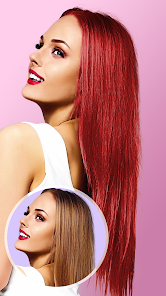
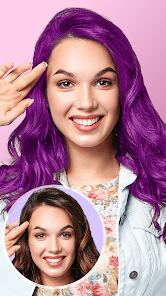
- 🎨 You can preview over 30 hair colors instantly, from natural black and blonde to bright rainbow shades, without any permanent change. That beats YouCam Makeup, which buries hair color under a dozen skin tools.
- ✂️ The brush tool lets you manually refine the selection area, so if the auto-detection misses a strand, you can correct it yourself. Facetune has a similar feature but is locked behind a subscription.
- ⚡ The processing speed is fast, taking under five seconds per new color, even on an older phone. Other apps like PicsArt take much longer with hair recoloring filters.
- 🔄 A slider for color intensity lets you tone down bold shades into subtle highlights, which gives more control than just applying a flat tint like in Hair Color Booth.
pros
- 👍 The app is completely free for basic colors, while apps like YouCam Makeup require a monthly plan for the same range. You just watch a short ad per save.
- 👍 The interface is simple and not overloaded with extra tools, so you can finish a hair color change in under a minute. Facetune has too many tabs that distract from the task.
- 👍 The color preview looks realistic on different hair textures, including wavy, straight, and curly styles, which is better than the fake look in Hair Color Booth.
cons
- 👎 The hair detection fails often on photos with messy or overlapping strands, so you have to manually paint large areas. YouCam Makeup does a much cleaner job with edge detection.
- 👎 Ads show up between every single color change, which breaks the flow. Facetune lets you try colors without interruptions in its paid version.
- 👎 You cannot save a high-resolution photo without paying or watching an ad, and the watermark is big. PicsArt gives a smaller watermark for free.
- 👎 There is no option to apply highlights or gradient effects, only solid colors. Apps like Hair Color Studio offer more creative blending tools.
Recommended Apps
![]()
Daily Horoscope
KADO Apps4.4
![]()
FOX Sports: Watch Live Games
Fox Digital Services, LLC3.7
![]()
Fake Call from Santa Claus
ThunderClap4.2![]()
Google Maps
Google LLC4.2![]()
PhotoLayers-Superimpose,Eraser
handyCloset Inc.4.6![]()
Healthy Benefits+
Solutran, Inc.4.5![]()
SuperMe - Avatar Maker Creator
THE.DEMON3.7![]()
Air Horn
Tenoku4.8![]()
Football Wallpaper HD 4K
Orange Infotech Studio4.6![]()
Artplay - AI Photo & Video
Hideaway Technology Limited4.5![]()
Horoscopes – Daily Zodiac Horo
Mail.Ru Group4.1![]()
Passport Parking
Passport Labs, Inc.2.5![]()
ParkMobile: Park. Pay. Go.
Parkmobile, LLC4.3![]()
FestAI: Ghost Detector App
Now Tech3.2![]()
Photo Tool
COLIFER LAB4





























