

Flowers Photo Frame

1M+
Installs
ClickLab Technology
Developer
-
Video Players & Editors
Category
-
Rated for 3+
Content Rating
-
clicklab7@gmail.com
Developer Email
-
https://clicklabprivacypolicy.blogspot.com/
Privacy Policy
Screenshots



editor reviews
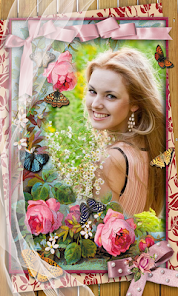
I first stumbled upon Flowers Photo Frame by ClickLab Technology while looking for something quick to spruce up a few garden pictures. It's basically a photo editing and embellishment app, squarely aimed at anyone who wants to slap floral decorations onto their snapshots without dealing with complex software. You download it from Google Play or the App Store, and it's free to install with a relatively modest number of downloads compared to major players in the editing space. After launching, the first impression is that it's incredibly simple, maybe even a bit too bare-bones. The interface is clean but feels a bit dated, and you're immediately hit with the option to either take a new photo or pick one from your gallery. There are no forced sign-ups, which is a huge plus, but you'll quickly notice the nagging ads unless you pay for an in-app purchase to remove them. It feels like a straightforward tool, nothing more.
Once you start using it, the app's personality becomes clear. You select a photo, and then you're presented with a grid of flower frames, stickers, and a few basic effects. The onboarding is nonexistent, but you don't really need a manual for this. The main actions involve tapping a frame to apply it, then using sliders to adjust opacity or rotate the decoration. A common usage scenario would be: pick a photo of a vase, tap a rose frame, adjust it so it sits right at the edge, and save. The process is smooth for the first few edits, but it gets repetitive fast because the customization is shallow. A practical tip is to use the pinch-to-zoom gesture to resize flowers, which isn't made obvious. The app can feel a bit confusing when you accidentally apply two frames on top of each other with no undo button, forcing you to start over. Some textures look nice, but others are pixelated on high-resolution phones. Overall, it's functional but feels like a tool from five years ago.
After using it for a while, I have mixed feelings. Someone who just wants to quickly add a pretty border to a photo for a social media post might enjoy this app, especially if they love floral themes. On the flip side, anyone who wants serious editing options, like blending modes or layer control, will find it too limiting and should stick with something like PicsArt or even Adobe Photoshop Express. What makes Flowers Photo Frame different is its specific focus on flowers, but that's also its biggest drawback because you're stuck with just that aesthetic. I ended up keeping it installed for about a week, but eventually uninstalled it because the ads became annoying and there wasn't enough variety to keep me coming back. It's a niche app that serves a very simple purpose, but it won't replace a full editing suite.
features
- 🌸 The standout feature is the huge collection of flower-themed frames and stickers, ranging from realistic roses to cartoonish daisies. Compared to something like Canva, which offers general design tools, this app gets specific and gives you ready-to-use floral elements without any graphic design skill. You just tap and place, which saves tons of time for flower lovers.
- 🌸 The opacity and rotation sliders for each decoration are surprisingly handy. While PicsArt lets you mask and blend layers for a polished look, Flowers Photo Frame cuts the complexity. You can fade a flower to look like a subtle watermark or spin it to match the photo's angle, all with simple sliders that even a first-time user can handle.
- 🌸 The "frame" presets that automatically wrap your photo with a floral border are a time-saver. Apps like VSCO focus on color correction, but this one gives you a one-tap solution for turning a boring picture into a decorative card. It might not have advanced color grading, but for a quick themed output, it works fine.
pros
- 🤍 One big strength is its complete focus on flowers, which beats general photo editors like Snapseed when you specifically need a rose or sunflower overlay. You don't have to search through thousands of random stickers to find one flower.
- 🤍 Another plus is the offline functionality. Unlike many apps that require a constant internet connection to download packs, Flowers Photo Frame works after the initial download, letting you edit on a plane or in areas with spotty signal.
- 🤍 The straightforward user interface is also a strength for non-techies. My grandmother, who struggles with typical photo apps, could easily use this to decorate her plant pictures, something impossible with the complex menus of Adobe Lightroom.
cons
- 💔 A major weakness is the very limited editing toolkit. You can't adjust brightness, contrast, or saturation within the app. If your photo is too dark, you have to edit it elsewhere first, unlike in apps like PicsArt which combine filters with decorative elements.
- 💔 The ads are intrusive and pop up between almost every action. While free apps need monetization, the frequency here is much worse than in competitors like YouCam Perfect, where ads are shown less often and are easier to close.
- 💔 The sticker and frame quality is inconsistent. Some flower images look crisp, while others appear low-resolution and blurry, especially on newer phones with high pixel density. This isn't an issue with dedicated sticker apps like Line Camera.
- 💔 There is no community or sharing feature built in. You can't browse other users' creations or get inspired, which makes the app feel like a standalone island. Compare that to Instagram's built-in editing, and it feels outdated.
Recommended Apps
![]()
Daily Horoscope
KADO Apps4.4
![]()
FOX Sports: Watch Live Games
Fox Digital Services, LLC3.7
![]()
Fake Call from Santa Claus
ThunderClap4.2![]()
Google Maps
Google LLC4.2![]()
PhotoLayers-Superimpose,Eraser
handyCloset Inc.4.6![]()
Healthy Benefits+
Solutran, Inc.4.5![]()
SuperMe - Avatar Maker Creator
THE.DEMON3.7![]()
Air Horn
Tenoku4.8![]()
Football Wallpaper HD 4K
Orange Infotech Studio4.6![]()
Artplay - AI Photo & Video
Hideaway Technology Limited4.5![]()
Horoscopes – Daily Zodiac Horo
Mail.Ru Group4.1![]()
Passport Parking
Passport Labs, Inc.2.5![]()
ParkMobile: Park. Pay. Go.
Parkmobile, LLC4.3![]()
FestAI: Ghost Detector App
Now Tech3.2![]()
Photo Tool
COLIFER LAB4





























