

Perfect365 Video Makeup Editor

1M+
Installs
Perfect365, Inc.
Developer
-
Video Players & Editors
Category
-
Everyone
Content Rating
-
android@perfect365.com
Developer Email
-
https://www.perfect365.com/about/privacy-policy/
Privacy Policy
Screenshots
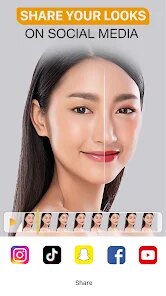
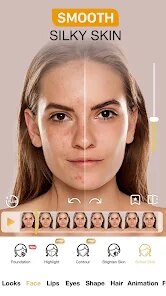
editor reviews
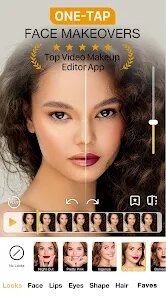
Perfect365 Video Makeup Editor is basically a beauty app that lets you try on makeup virtually, but it's specifically built for video rather than just static selfies. It falls under the photo and video editing genre, and the main draw is being able to slap on foundation, lipstick, eyeshadow, or even change your hairstyle while you're recording or livestreaming. You might download it from Google Play or the App Store if you're into makeup but don't want to commit to a full face before a video call or a TikTok post. The first impression after launching the app is actually pretty straightforward — it throws you straight into a camera view with a few preset looks, so you don't have to hunt around for where to start. It's free to download, though you'll run into in-app purchases pretty quickly if you want the better filters or to remove watermarks. There's also the usual ads popping up here and there, which can be a bit annoying when you're just trying to test a shade.
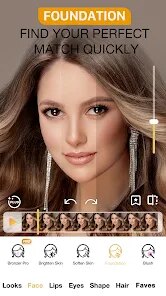
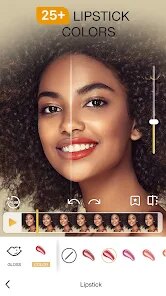
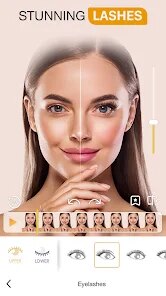
When you actually start using it, the experience is mostly smooth but has its quirks. The interface shows a live preview of your face, and you can tap through different makeup categories at the bottom — lips, eyes, face, brows, that sort of thing. Each category has a bunch of presets, and you can adjust the intensity by sliding a bar left or right. For daily use, you'd probably just pick a look, tweak the strength so it doesn't look too fake, and hit record. One thing that's a bit confusing at first is that the makeup doesn't always stick perfectly if you turn your head too fast, especially around the nose or jawline. It works best when you're facing the camera straight on. A small tip: if you're using it for a video call, you can actually export the look as a filter and use it in other apps, which saves a ton of time. The onboarding is minimal — no tutorial, just a few tool tips — so you kind of have to poke around to figure out where the more advanced settings are hiding.
After messing around with it for a while, I think this app is a solid pick if you're someone who makes short videos or does livestreams and wants to look polished without actually doing makeup. It's pretty forgiving on skin texture and lighting, which is a plus over some other beauty apps that make you look plasticky. That said, if you're just looking for a quick selfie editor, you'd probably be better off with something like YouCam Perfect, which has more filters and less hassle. The video aspect is really the standout here, but the free version is fairly limited — you'll feel the push to upgrade after using a few of the nicer looks. I kept it installed because I do the occasional video call with clients, and it's a quick way to look put-together, but I can see someone uninstalling it if they're not into video content or don't want another subscription eating into their wallet.
features
- 💄 Real-time video makeup tracking: Unlike YouCam Makeup, which works great for photos but can lag on video, Perfect365 keeps the makeup locked onto your face even when you're moving during a livestream or recording. It's not perfect, but it handles side turns and expressions better than most competitors in this niche.
- 🎨 Adjustable intensity sliders: Every makeup look lets you slide the effect from subtle to full-on glam. This is huge because YouCam Makeup often applies the look at a fixed strength, and you have to dig into settings to change it. Here, it's right there on the main screen, so you can dial it back for a natural daytime look or crank it up for evening drama.
- 📱 Livestream integration: You can apply the makeup directly inside apps like Instagram or TikTok through the camera overlay. Most beauty editors force you to record first and edit later, but Perfect365 lets you go live with the makeup already on, which is a game-changer for streamers who want to appear flawless in real time.
pros
- 😊 Solid facial tracking for a free app: Compared to Facetune's video tools, which require a paid subscription for basic tracking, Perfect365 gives you decent real-time mapping without paying a dime. It's not Hollywood-level, but it works reliably for casual use.
- 🎥 Focus on video rather than just photos: Most similar apps, like BeautyPlus or YouCam Perfect, are heavily photo-oriented with video as an afterthought. Perfect365 flips that, dedicating its core engine to live video and recording, which means less lag and fewer glitches when you're moving.
- 🔧 Easy to tweak and undo: The undo button and reset option are front and center, so you can try a bold lip or crazy eyeshadow without worrying about messing up. Apps like Meitu often bury these options in menus, making it annoying to backtrack.
cons
- 💸 Heavy paywalls for good looks: The free library is decent but repetitive, and almost every attractive filter or style is locked behind a subscription. YouCam Makeup offers more free content upfront, making Perfect365 feel stingy by comparison.
- 📸 Struggles with non-front-facing angles: If you're not looking straight at the camera, the makeup can slide off your nose or lips. Facetune's video mode handles profile shots better, which is a letdown if you like dynamic angles in your videos.
- 📺 Ads interrupt the flow: You'll get a full-screen ad after almost every look change or export. BeautyPlus has ads too, but they're less intrusive and usually skippable after a few seconds. Here, they sometimes force you to wait, killing the momentum when you're trying to record quickly.
Recommended Apps
![]()
Daily Horoscope
KADO Apps4.4
![]()
FOX Sports: Watch Live Games
Fox Digital Services, LLC3.7
![]()
Fake Call from Santa Claus
ThunderClap4.2![]()
Google Maps
Google LLC4.2![]()
PhotoLayers-Superimpose,Eraser
handyCloset Inc.4.6![]()
Healthy Benefits+
Solutran, Inc.4.5![]()
SuperMe - Avatar Maker Creator
THE.DEMON3.7![]()
Air Horn
Tenoku4.8![]()
Football Wallpaper HD 4K
Orange Infotech Studio4.6![]()
Artplay - AI Photo & Video
Hideaway Technology Limited4.5![]()
Horoscopes – Daily Zodiac Horo
Mail.Ru Group4.1![]()
Passport Parking
Passport Labs, Inc.2.5![]()
ParkMobile: Park. Pay. Go.
Parkmobile, LLC4.3![]()
FestAI: Ghost Detector App
Now Tech3.2![]()
Photo Tool
COLIFER LAB4





























